Random Game Generator
The random game generator picks one of 48 games, six each of board, card, word, outdoor, party, video, puzzle and active games. Set the filters to match your group, or leave them on any, and press the button.
Updated
Game filters
How the random game generator picks a game
The page holds 48 games, each tagged with a type, a group size, an age range and a typical length. The four filters keep only the games whose tags match, and one of those is drawn at random. Leave a filter on “any” to ignore it.
The types are split evenly, six games each, from board games such as Chess and Clue to active games such as Limbo. Group sizes are not even: 16 games suit a large group but only 4 are for two players, so a filter can leave just a handful. If nothing matches, the page tells you so; loosen a filter and try again.
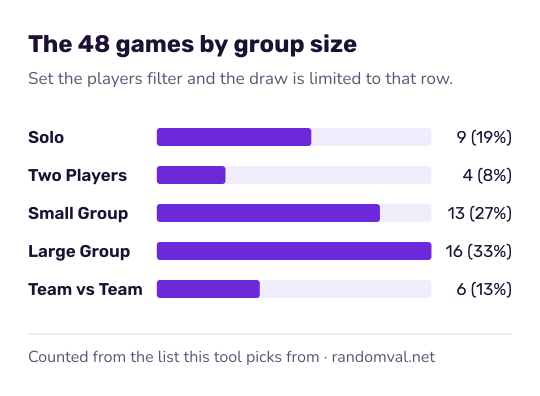
The tags are rough guides written for this list. Playing time and suitable ages vary with the edition and with the people at the table, so check the box before you promise a quick game. Each pick is an unbiased draw from the browser's cryptographic random generator, as described in how our randomness works.
Example: a quick game for a big group
Twelve people at a birthday party have ten minutes before the cake. Set the players to “Large Group (6+)” and the duration to “Quick (5-10 min)”, leave type and age on any, and press the button.
Eight games match, among them Musical Chairs, Simon Says, Freeze Dance and Word Association, so each has a 1 in 8 chance. Press again if the first pick needs music and nobody brought a speaker.
Game night extras
Need teams? Use the team generator. Need to decide who starts? Spin the wheel or roll in the dice roller.
For a card game, the random card generator draws from a standard deck. For a round of charades or Pictionary, the random animal generator and the random word generator supply the things to act out or draw.
Questions about the random game generator
How many games are on the list?
48: six board games, six card games, six word games, six outdoor games, six party games, six video games, six puzzle games and six active games. With every filter on “any”, each game has a 1 in 48 chance.
Why does “Kids” not show the family games?
Each game carries one age tag, and the filter shows only the games with exactly that tag. “Kids (5-10)” gives the 19 games tagged for kids; the 16 games tagged “Family Friendly” suit children too but sit under their own option.
Can I add my own games?
Not on this page. Type your own shortlist into the picker wheel and spin it, or use the random choice generator.
Sources
- Wikipedia: Board game — what counts as a board game (checked October 16, 2026)