Random Year Generator
The random year generator picks whole years between a start and an end year, both included, and every year in the range has the same chance. Set the first and last year and how many you need, then press the button.
Updated
How the random year generator picks a year
Set a first and a last year. Each year in the range, both ends included, has the same chance. Ask for several years and each is drawn independently, so the same year can appear more than once.
From 1900 to 2024 there are 125 years, so each has a chance of 1 in 125 (0.8%). Each pick is an unbiased draw from the browser's cryptographic random generator, as described in how our randomness works.
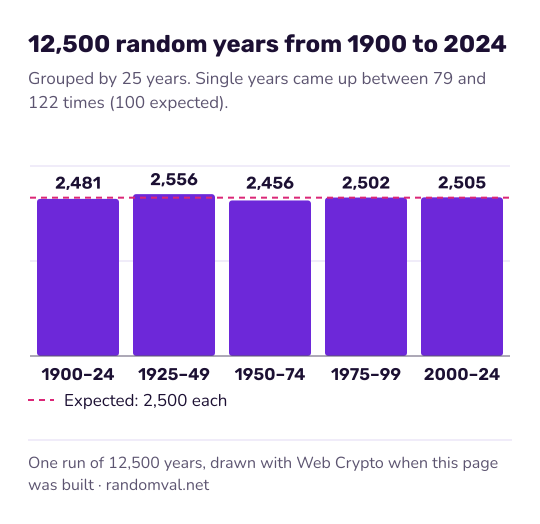
Odds for a random year from 1900 to 2024
The table uses the default range. Leap years follow the Gregorian calendar rule, so 1900 does not count: it is divisible by 100 but not by 400.
| Result | Chance in one draw |
|---|---|
| One particular year, such as 1969 | 1 in 125 (0.8%) |
| A year in the 1980s | 10 in 125 (8%) |
| A year from 2000 on | 25 in 125 (20%) |
| A leap year | 31 in 125 (24.8%) |
Repeats come sooner than most people expect, the same effect as in the birthday problem. Ten years drawn from this range contain at least one repeat 30.9% of the time.
Example: a history quiz with random years
A quiz host sets the range to 1950 to 1999 and asks for 5 years. Each team gets one year and has a minute to name something that happened in it.
With 50 years in the range, two of the five years match 18.6% of the time. If that happens, the host presses the button again. For a discussion round instead, the random topic generator has a History & Politics category.
Ways to use a random year
- History quiz: draw a year and name something that happened in it.
- Sample data: birth years, model years or founding years for a test database. The test data generator makes whole rows with full dates.
- Story prompts: draw a year and set a scene in it. A height from the random height generator helps sketch the character who lives there.
For a full date, use the date generator.
Questions about the random year generator
Can the same year come up twice?
Yes, when you ask for several years: each one is drawn independently. With 10 years from the default range of 125, the chance of at least one repeat is 30.9%. For a list with no repeats, use the random number generator with the same range and No repeats ticked.
How many years can I get at once?
From 1 to 100 per press. The years appear in the order they were drawn, separated by commas, and the copy button puts the whole list on your clipboard.
Is a leap year more likely?
No. Every year has the same chance, so a leap year comes up as often as leap years appear in your range. From 1900 to 2024 that is 31 years in 125, or 24.8%.
Sources
- Wikipedia: Gregorian calendar — the leap year rule, under which 1900 was not a leap year (checked October 16, 2026)
- Wikipedia: Birthday problem — the chance of a repeated year in several draws (checked October 16, 2026)