Random Date Generator
The random date generator picks a calendar date between two dates you set, and every day in the range, both ends included, is equally likely. Set the first and last date, then press Pick a date.
Updated
Date
–
Last 10 dates
How to pick a random date between two dates
The page follows three steps, and you can follow the same steps by hand with any fair source of numbers.
- Count the days from the first date to the last date, both included.
- Draw one whole number from 0 to that count minus one, for example with the random number generator.
- Add that many days to the first date. That is the result.
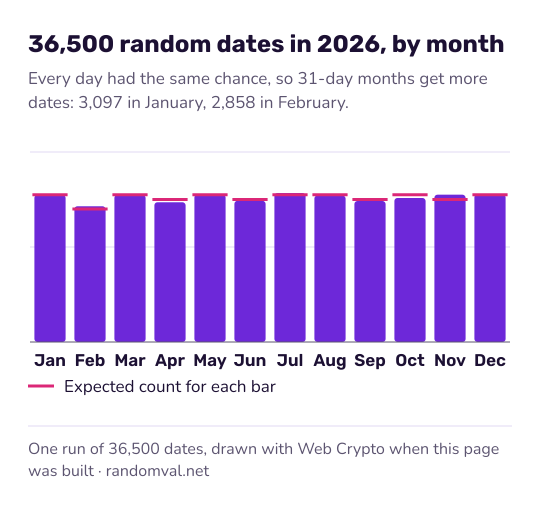
Every day in the range has the same chance, leap days included. From January 1, 2024 to December 31, 2024 there are 366 days, because 2024 is a leap year in the Gregorian calendar, so each has a chance of 1 in 366.
The page makes the draw in step 2 with the browser's cryptographic random generator, as described in how our randomness works.
If you tick Add a random time of day, a second draw picks one of the 86,400 seconds of the day and shows it as hours, minutes and seconds on a 24-hour clock. For a time on its own, use the random time generator.
Date formats and the day of the week
The long format starts with the weekday, as in Monday, January 1, 2024. The format 2024-01-01 follows ISO 8601: year, month, day, so dates sort correctly as text. The two slash formats differ only in order: month first, as usual in the US, or day first.
In the other formats the weekday is shown under the result. Over a long range each weekday comes up about one time in seven.
To pick only a day of the week, set the range to any seven days in a row, for example a Monday to the following Sunday. Each weekday then has a chance of exactly 1 in 7.
What a random date generator is used for
- Test data: birth dates, order dates and deadlines for a development database. The test data generator can add a date column to whole rows.
- Sampling: choosing a day to audit, review or re-check.
- Games and writing: a date for a story, a quiz question or a “what happened on this day” search. For a character's birthday and build, add a height from the random height generator.
Questions about the random date generator
What range does it use if I change nothing?
January 1, 1970 to today's date on your device. Change either date to any day the date field accepts; the first date must not be after the last.
Are leap days included?
Yes. February 29 exists only in leap years, and in those years it has the same chance as any other day: 1 in 366 for a range covering all of 2024.
How do I pick a random birthday in the 1990s?
Set the first date to January 1, 1990 and the last to December 31, 1999. That range has 3,652 days, so each has a chance of 1 in 3,652. For a year alone, the random year generator is quicker.
Sources
- Wikipedia: Gregorian calendar — leap years and the 366-day year (checked October 16, 2026)
- Wikipedia: ISO 8601 — the year-month-day date format (checked October 16, 2026)