Random Location Generator
The random location generator draws a random latitude and longitude, anywhere on Earth or inside the bounding box of one of 15 countries. Choose the world or a country and press the button; the result links to the point on a map.
Updated
How the random location generator picks a point
The page draws a latitude and a longitude inside a rectangle. For “Anywhere in the world” the rectangle is the whole globe: latitude from −90 to 90 and longitude from −180 to 180, the full range of the geographic coordinate system.
For a country it is that country's bounding box, the smallest rectangle of latitude and longitude that contains it. The 15 country boxes are approximate values built into the page.
Each pick is an unbiased draw from the browser's cryptographic random generator, as described in how our randomness works.
Why random points land at sea, abroad or near the poles
Drawing evenly inside a rectangle has three side effects:
- Most world points are water. The ocean covers more than 70 percent of Earth's surface, so expect a lot of open sea.
- A country pick can land outside the country. A bounding box includes whatever lies between the borders and the rectangle: sea, lakes and parts of neighbouring countries.
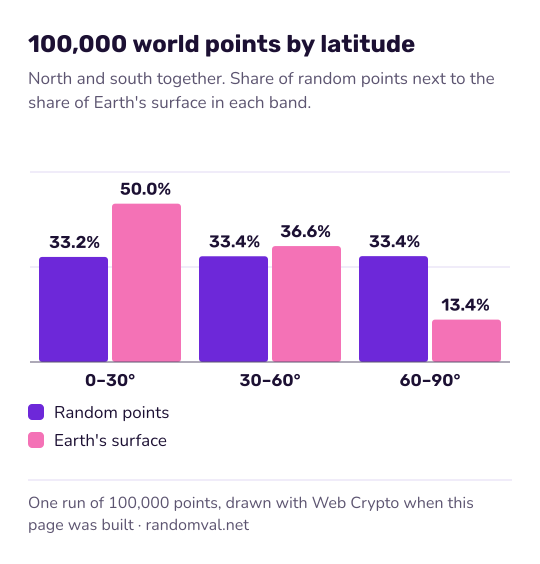
- The poles are over-represented. Latitude is drawn evenly in degrees, and lines of longitude crowd together near the poles, so high-latitude areas get more points per square kilometre than the equator does. The chart shows one run of 100,000 world points by latitude band.
How precise the random coordinates are
The result has six decimal places, which pins a point down to about 11 cm at the equator (see decimal degrees). The link opens the point in Google Maps in a new tab; nothing is sent to a map service unless you click it.
For a famous sight rather than a bare point, use the random place generator. For a country name without coordinates, the random country generator picks from 195.
Questions about the random location generator
Why do I keep getting the ocean?
Because the ocean covers more than 70 percent of the planet and the world option draws from the whole globe. Picking a country narrows the box, though some points still fall in the sea. For a place where people live, use the random city generator.
Are the points spread evenly over the Earth?
No. Latitude is drawn evenly in degrees, so the bands beyond 60° north and south get a third of the points on average while they cover only about 13% of Earth's surface. The band between 30° south and 30° north covers half the surface but also gets only a third of the points.
Sources
- Wikipedia: Geographic coordinate system — latitude from −90 to 90 and longitude from −180 to 180 (checked October 16, 2026)
- NOAA: How much water is in the ocean? — the ocean covers more than 70 percent of Earth's surface (checked October 16, 2026)
- Wikipedia: Decimal degrees — six decimal places are precise to about 11 cm at the equator (checked October 16, 2026)