Random City Generator
The random city generator picks one of 73 well-known cities in 51 countries and shows its country and continent. Leave the filter on all locations or narrow it to a continent or a country, then press the button.
Updated
How the random city generator picks a city
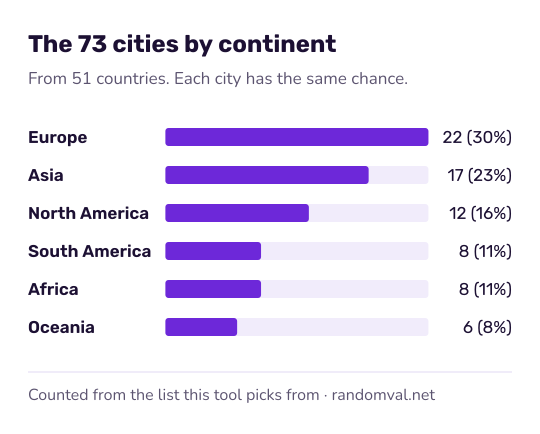
The page holds a list of 73 well-known cities, each tagged with its country and continent: 22 in Europe, 17 in Asia, 12 in North America, 8 each in South America and Africa, and 6 in Oceania. With the filter on all locations every city has the same chance, 1 in 73.
Choose “Continent” or “Country” and a second menu appears; the draw is then limited to the cities with that tag. The country menu lists the 51 countries that have at least one city on the list.
Each pick is an unbiased draw from the browser's cryptographic random generator, as described in how our randomness works.
What the city list includes and leaves out
The list is a short selection of large and famous cities. It is not a gazetteer, many countries are not represented, and a city's chance has nothing to do with its size. No city is tagged Antarctica.
Each city has one continent tag. Istanbul, which lies on both sides of the Bosporus, is tagged Asia, and Moscow is tagged Europe.
For US cities only, the random US city generator picks from 100 large cities with a state filter. For the country alone, the random country generator covers 195 countries.
Ways to use a random city
- Geography quiz: draw a city and name its country, or find it on a blank map.
- Story setting: let chance pick where the next chapter takes place. For a town that does not exist, use the town name generator.
- Reading list: draw a city and look up one thing you did not know about it.
Questions about the random city generator
How many cities are on the list?
73 cities in 51 countries. Europe has 22, Asia 17, North America 12, South America and Africa 8 each, and Oceania 6. The United States has the most of any country, with eight, followed by Australia with four.
Are these the largest cities in the world?
No. They are well-known cities chosen for quizzes and games, so Edinburgh, Marrakech and Wellington sit next to Tokyo and Mumbai. Every city has the same 1 in 73 chance, whatever its population.
Can I get a random city in one country?
Yes, if the country is on the list: set the filter to Country and choose one of the 51. Most have a single city, so the result is always the same. For the United States, the random US city generator picks from 100 cities.
Sources
- Wikipedia: Bosporus — the strait between Europe and Asia that runs through Istanbul (checked October 16, 2026)