Random Quote Generator
The random quote generator shows one of 26 famous quotes, each with the speech, book, poem or letter it comes from, so you can check it. Press the button for a quote, or search the list by author or word.
Updated
Press the button for a quote.
How the random quote generator picks a quote
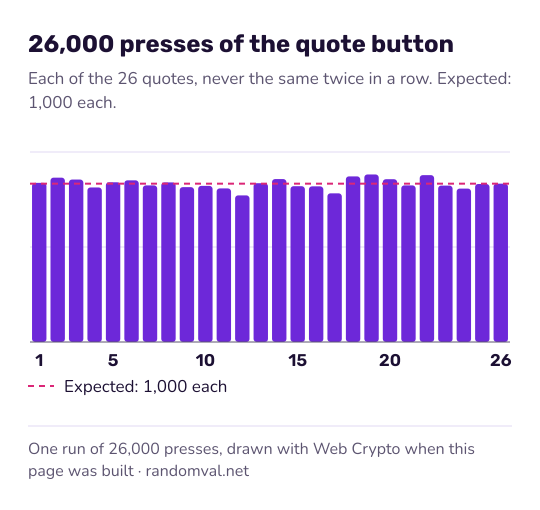
The page holds 26 quotes. Each press of the button draws one at random with equal chances, and draws again if it would repeat the quote you are looking at, so after the first press each of the other 25 has a 1 in 25 chance.
The search box filters the same list by author, word or source. Each pick is an unbiased draw from the browser's cryptographic random generator, as described in how our randomness works.
How the quotes on the list were chosen
Many “famous quotes” that circulate online are misattributed, reworded or cannot be traced to anything the person wrote or said. Wikiquote's page on Abraham Lincoln, for example, lists his sourced quotes apart from a long section of misattributed ones.
An earlier version of this page had many of those lines. They were removed, and the list now holds only lines that can be traced to a named speech, book, poem or letter, which is shown next to the author. The two lines from Steve Jobs, for instance, both come from his 2005 Stanford commencement address.
The wording follows the commonly printed English text. For older works and translations, such as Descartes, Plato and Wittgenstein, other editions phrase the line differently. If you plan to print a quote, check it against the work itself; we have not compared each line with a specific edition.
Ways to use a random quote
- A line to open a talk, a lesson or a newsletter.
- A discussion starter: who said it, in what situation, and does it still hold?
- A prompt for a short essay. The random topic generator offers questions if you would rather argue than interpret.
For a verse instead of a quote, the random Bible verse generator picks from 34 King James verses. For something lighter, try the random joke generator.
Questions about the random quote generator
Can the same quote come up twice in a row?
No. If a press would show the quote already on screen, the page draws again. Over many presses every quote still comes up about equally often.
Why is a quote I know not on the list?
The list keeps only lines that can be traced to a named speech, book, poem or letter. Many popular quotes fail that test; they are reworded, or nobody can show where the person said them.
Sources
- Wikiquote: Abraham Lincoln — sourced quotes listed apart from attributed and misattributed ones (checked October 16, 2026)
- Wikiquote: Steve Jobs — the 2005 Stanford address that two of the quotes come from (checked October 16, 2026)