Planet Generator
The planet generator makes a fictional planet in one of 8 types, from rocky worlds to gas giants, with a name, a diameter, an atmosphere, moons, a temperature and a picture. Choose a type or leave it on random, then press the button.
Updated
How the planet generator builds a planet
The page draws a type, or uses the one you chose, then draws each value from a range set for that type. A rocky planet gets a smaller diameter and few moons, a gas giant a large diameter and many moons, a volcanic world a high temperature.
The name is put together from short syllables with an optional ending such as “-b” or “Major”, and the picture is drawn on the spot in colors that match the type. Each value is an unbiased draw from the browser's cryptographic random generator, as described in how our randomness works.
Everything on a generated planet is fiction. Real astronomy is plainer: NASA sorts the planets found around other stars into four types, gas giant, Neptunian, super-Earth and terrestrial. The ranges here are chosen for storytelling and are not astronomical data, so use the output for games and stories, not for homework.
The 8 planet types and their ranges
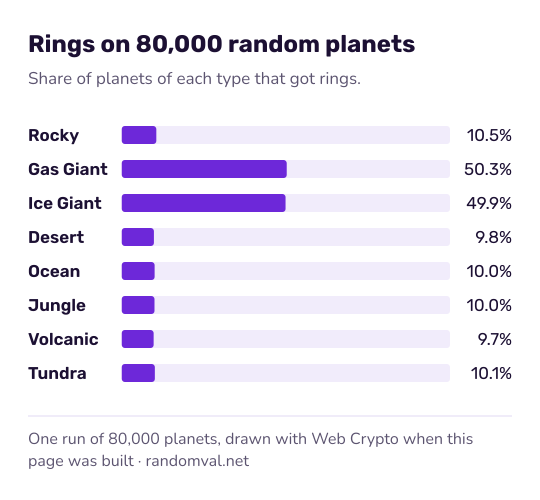
“Random” gives each of the eight types the same chance, 1 in 8. Each value is then drawn evenly from the type's range:
| Type | Diameter (km) | Moons | Temperature (°C) | Rings |
|---|---|---|---|---|
| Rocky | 3,000–15,000 | 0–3 | −100 to 200 | 10% |
| Gas giant | 50,000–150,000 | 10–80 | −180 to −120 | 50% |
| Ice giant | 30,000–60,000 | 5–30 | −220 to −180 | 50% |
| Desert | 4,000–12,000 | 0–2 | 40 to 120 | 10% |
| Ocean | 8,000–20,000 | 1–4 | −20 to 40 | 10% |
| Jungle | 10,000–18,000 | 1–3 | 20 to 45 | 10% |
| Volcanic | 3,000–10,000 | 0–2 | 200 to 800 | 10% |
| Frozen tundra | 5,000–15,000 | 0–5 | −80 to −20 | 10% |
Day length is 10 to 110 hours and the year 50 to 5,049 days for every type. The atmosphere comes from a short list per type, such as Earth-like or dense for an ocean world and toxic, dense or radioactive for a volcanic one.
How the planet generator decides if a planet is habitable
A planet is marked habitable when three simple rules hold: the temperature is above −50 °C and below 60 °C, the atmosphere is Earth-like or dense, and the gravity is between 0.5 g and 2 g. Gravity is the diameter divided by Earth's 12,742 km, times a density factor for the type.
Example: an ocean world 15,000 km across gets 15,000 ÷ 12,742 × 0.8 = 0.94 g. Ocean temperatures run from −20 to 40 °C and its atmospheres are all Earth-like or dense, so every ocean world passes. A rocky planet never does, because its atmosphere is always none or thin.
Using a generated planet in a story or game
Name the planet's seas and mountains with the place name generator, then give its people a ruler from the royal name generator and a banner from the flag generator. For the story itself, the random plot generator offers sci-fi story ideas, and the art prompt generator can suggest how to paint the planet.
Questions about the planet generator
Are the generated planets real?
No. Every value is drawn from a range set inside the page for storytelling, and the name is put together from syllables. For planets that astronomers have actually found, see NASA's exoplanet pages.
Which planet types can be habitable?
Only three. Ocean and jungle worlds always pass the page's habitability rule, frozen tundras pass about 1 time in 9, and the other five types never do. On “Random”, about 26% of planets come out habitable.
Why does the picture look different for the same type?
Each type has five colors, and the picture uses one of them at random. Spots, craters or bands are then scattered at random positions, so no two pictures are quite the same.
Sources
- NASA Science: Exoplanet types — the four types scientists sort exoplanets into: gas giant, Neptunian, super-Earth and terrestrial (checked October 16, 2026)