Random Art Prompt Generator
The random art prompt generator builds a drawing or painting prompt from a subject, a style, a mood and a color palette, drawn from lists of 31, 24, 22 and 21. Press the button for a prompt, or fix the style, subject or mood first.
Updated
Your art prompt
Press the button for your first prompt.
Previous prompts
How the random art prompt generator builds a prompt
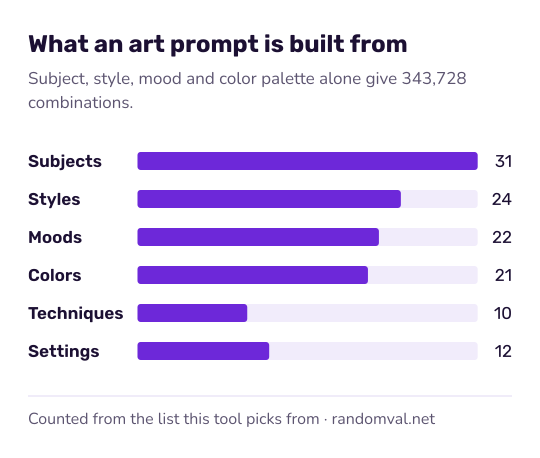
A prompt is put together from six lists: 31 subjects, 24 styles, 22 moods, 21 color palettes, 10 technique suggestions and 12 settings. Many of the styles, such as impressionism, cubism and art nouveau, are art movements: look at a few real works in that style before you start.
The filters at the top fix the style, subject or mood; anything you leave open is drawn at random, with every option equally likely. A setting is added to about half of the prompts, and a technique to about half.
The parts are combined without checking whether they suit each other, so you will sometimes get an odd mix, such as a minimalist underwater scene in neon colors. Each pick is an unbiased draw from the browser's cryptographic random generator, as described in how our randomness works.
Example: one art prompt, one fifteen-minute sketch
Set the style filter to Ink Drawing and leave the rest open. One press can give: “Create a nostalgic ink drawing artwork of a vintage car in the rain, using sunset colors as your main palette.”
Block in the car's shape first, then the rain in quick vertical strokes. Keep the sunset colors for the reflections on the wet road, so the warm tones stand out against the ink. If the palette says complementary colors, pick one opposite pair, such as blue and orange, and use nothing else.
Ways to use random art prompts
- Daily sketch: one prompt, fifteen minutes, no erasing.
- Constraint practice: fix the style you are studying and let subject and mood vary.
- Group challenge: everyone draws the same prompt and compares results.
For an exact palette, start from a color picked by the random color generator. When the subject is “animal”, the random animal generator decides which one. For a story to illustrate, try the random plot generator.
Questions about the random art prompt generator
How many different prompts can it make?
The subject, style, mood and color alone give 31 × 24 × 22 × 21 = 343,728 combinations. The optional setting (12 options) and technique (10 options) multiply that again.
Why are some styles missing from the filter menu?
The menus offer 18 styles, 20 subjects and 17 moods. The rest, such as baroque, robot or tranquil, only come up when that filter is left on “Any”.
Are my prompts saved?
The last five prompts are listed under Previous Prompts while the page is open. They are not stored anywhere, so copy any you want to keep before you leave the page.
Sources
- Wikipedia: Art movement — styles such as impressionism and cubism as art movements (checked October 16, 2026)
- Wikipedia: Complementary colors — what a complementary color palette is (checked October 16, 2026)